Creating engaging video content is no longer limited to professionals with expensive software and high-end computers. Whether you’re a content creator, student, marketer, or small business owner, a free online video editing tool can offer everything you need to produce high-quality videos without breaking the bank. Thanks to the rise of browser-based technology and cloud computing, it’s easier than ever to find a free video editing app that’s both powerful and user-friendly.
In this article, we’ll explore how to choose the best free video editing app, what features to look for, and some top recommendations you can start using today. If you’re ready to start editing videos without downloading software or spending money, keep reading.
Why Use a Free Online Video Editing Tool?
The biggest benefit of using a free online video editing tool is convenience. You don’t need to install large software files or worry about your device’s specs. All you need is a stable internet connection and a browser. These tools are often intuitive and perfect for quick edits, whether you’re trimming a clip, adding subtitles, or uploading directly to social media.
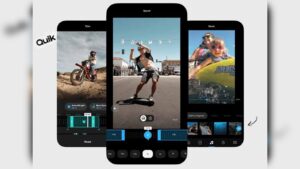
For many users, especially those just starting out, paying for premium software like Adobe Premiere Pro or Final Cut Pro isn’t practical. That’s where a free video editing app comes in—it gives you enough features to create professional-looking content without the high price tag.
Key Features to Look For in a Free Online Editor
Before you commit to a free video editing app, it’s important to make sure it offers the features you need. Here are some must-haves:
-
Drag-and-Drop Interface: This makes it easy to learn and use, even for beginners.
-
Text and Caption Tools: Perfect for adding context, branding, or accessibility to your videos.
-
Transitions and Effects: Smooth scene changes can enhance your video’s overall quality.
-
Stock Media Access: Some editors include royalty-free music, images, and video clips.
-
Cloud Storage Integration: Save your progress and access your projects from any device.
A good free video editing app should offer at least a few of these features even without a subscription.
Top Free Video Editing Apps That Work Online
There are plenty of online video editing platforms, but not all are created equal. Below are some of the best free video editing app options that also double as powerful free online video editing tools:
1. Clipchamp
Now owned by Microsoft, Clipchamp is a browser-based editor with a clean interface and solid features. It allows you to trim clips, add music, insert titles, and export videos up to 1080p—even on the free plan. It’s an ideal free video editing app for content creators who need quick results with minimal fuss.
2. Kapwing
Kapwing is a versatile free online video editing tool that supports everything from video trimming to meme creation. Its user-friendly interface is especially great for social media content creators. The free version offers good export quality and access to collaborative tools.
3. Canva Video Editor
Best known for graphic design, Canva has added a robust video editor that lives entirely online. It’s a fantastic free video editing app if you’re already using Canva for your branding needs. The editor supports drag-and-drop video creation, custom animations, and more.
4. WeVideo
WeVideo is a cloud-based platform suitable for education and small businesses. While the free plan has some limitations on exports, it still functions as a practical free online video editing tool for simple edits, especially if you want to store projects in the cloud.
5. InVideo
InVideo provides templates that make creating videos fast and efficient. It’s particularly useful for marketers and social media managers. As a free video editing app, InVideo allows you to access basic editing tools, though watermarks are present on the free plan.
Pros and Cons of Free Online Video Editing
Like anything free, there are trade-offs. Here’s a quick breakdown:
Pros:
-
No installation required
-
Works on any device with a browser
-
Cost-effective for startups and students
-
Easy to learn with no technical background
Cons:
-
Some features may be locked behind paywalls
-
Free versions may include watermarks
-
Limited export quality (usually capped at 720p or 1080p)
-
Slower rendering speeds on basic plans
Still, for quick edits or social content, a free video editing app delivers more than enough power to get the job done.
Final Thoughts: Find the Best Tool for Your Needs
Whether you’re creating content for YouTube, Instagram, TikTok, or a classroom project, the right free online video editing tool can help you tell your story. While there are limitations to what a free video editing app can offer, many tools available today rival premium software in usability and design.
Remember, the best free video editing app is the one that matches your workflow, content goals, and level of experience. Try out a few platforms before committing, and don’t be afraid to experiment. With consistent use and creativity, you can produce polished videos without spending a cent.